
Adobe‘s launch of its Creative Cloud subscription service has been a success with over 325,000 paid and one million free members. Today, the company is updating its suite of products for designers and developers by adding the first public preview of Adobe Edge Reflow, a design tool for easily creating responsive websites.
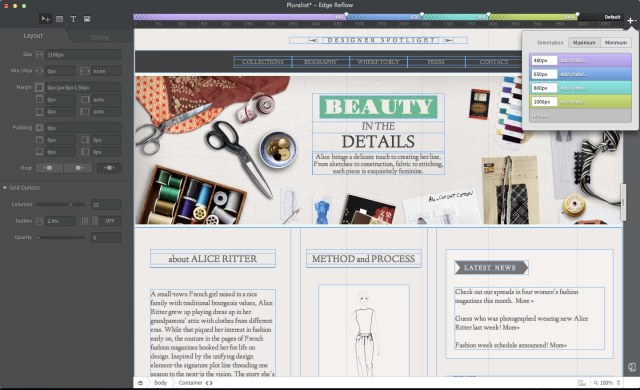
The public preview of Edge Reflow, which the company first talked about last September, is aimed at designers who have a general understanding of responsive layout and web design, as Adobe’s Vice President of Product Development Paul Gubbay noted during a press briefing earlier this month. It’s essentially a very visual tool for creating responsive layouts that allow designers to create sites that look good on a huge screen, laptop, tablet and phone.
Reflow allows developers to take a mobile- or desktop-first approach by setting break points for different screen sizes based on a visual inspection of how their content flows. The tool is mostly driven by this visual aspect (you just grab a bar on the right and drag it to the left to make the virtual screen smaller and see where things should flow differently), but you can also dig into the details of the design (margins, fonts, shadows etc.) and extract the CSS for further development. The tool is also deeply integrated with Edge Inspect for real-time previews, so designers can quickly see their new creations directly in the browser.
Reflow is now available for all Creative Cloud members, including those with free accounts.
In addition, Adobe is updating its Edge Animate tool for creating interactive and animated HTML5 content with a new visual web-font selector and new CSS capabilities. The tool now supports CSS gradients and filters (so you can, for example, easily add blur effects) and makes it simpler to add rich typography powered by the company’s free Edge Web Fonts service.
Dreamweaver, too, is getting support for these web fonts and now features an updated grid layout for creating fluid grids.
Disrupt 2026: The tech ecosystem, all in one room
Your next round. Your next hire. Your next breakout opportunity. Find it at TechCrunch Disrupt 2026, where 10,000+ founders, investors, and tech leaders gather for three days of 250+ tactical sessions, powerful introductions, and market-defining innovation. Register now to save up to $400.
Save up to $300 or 30% to TechCrunch Founder Summit
1,000+ founders and investors come together at TechCrunch Founder Summit 2026 for a full day focused on growth, execution, and real-world scaling. Learn from founders and investors who have shaped the industry. Connect with peers navigating similar growth stages. Walk away with tactics you can apply immediately
Offer ends March 13.
The update to Edge Code Preview, Adobe’s code editor for HTML, CSS and JavaScript that is completely written in HTML5 itself, is getting live previews so developers can see changes in the browser as they make them, and code hinting for more CSS properties and HTML tags. The coolest feature here, though, is probably the addition of a Quick Edit feature that allows you to edit code in context instead of having to switch between files.