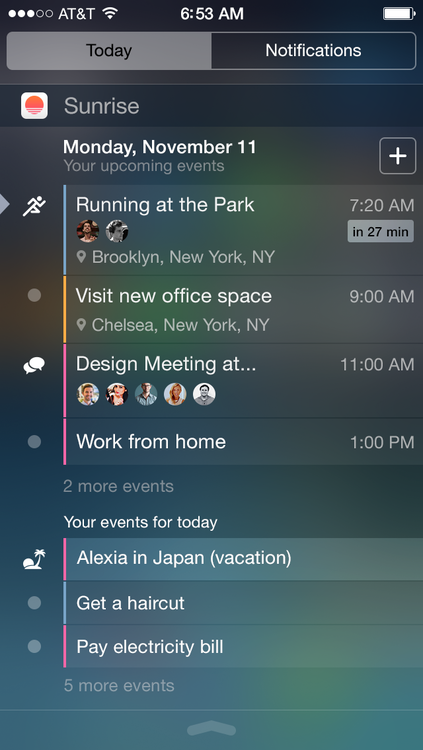
Sunrise has been one of my favorite mobile apps for years now. But the brand new 3.0 update for iOS, combined with iOS 8, makes it one of the best examples of a good iOS 8 widget for the Today view. In one swipe, I can now view my upcoming events and all-day events. As a reminder, Sunrise works with iCloud calendars, Google Calendar and Microsoft Exchange.
There are also a few other features coming with this release. The app is now compatible with the iPhone 6 and iPhone 6 Plus screen sizes — you will now see more events when you open the app. And after introducing third-party apps in June, the company just added two new integrations, Google Tasks and Eventbrite.
You can now add, edit and mark as complete your to-dos from Google Tasks in Sunrise without ever having to leave the app. Similarly, whenever you purchase a ticket on Eventbrite, it will show up in your Sunrise calendar without having to manually add an event. You can connect your accounts in the settings on iOS, Android and the web.
While these two new integrations are nice, the best new feature is the new iOS widget. Many have praised Fantastical for its widget. But I didn’t find it very practical. In Fantastical, you can choose to have a tiny month view in Notification Center or a list of upcoming events. While the upcoming events configuration is reminiscent of Sunrise’s new feature, Fantastical’s list lacks the kind of rich information that you get in Sunrise’s widget.
But people were mostly impressed with the month view. It means that you could get a fully functioning calendar in the Today view. In other words, Fantastical’s widget is like a baby version of the full app.
Yet, iOS 8 widgets can easily become too cumbersome if they try to mimic a full-fledged app. For example, Neato simulated a keyboard in its widget to let you take notes directly from the Today view. It’s a terrible experience as this keyboard is in no way as efficient as your default keyboard.
Instead, I’d much rather have well-designed widgets that give me relevant information. Each item can be a deep link to launch a particular screen of an app. iOS 8’s widgets let me build a personal status board that is always available, even when my iPhone is locked.
Disrupt 2026: The tech ecosystem, all in one room
Your next round. Your next hire. Your next breakout opportunity. Find it at TechCrunch Disrupt 2026, where 10,000+ founders, investors, and tech leaders gather for three days of 250+ tactical sessions, powerful introductions, and market-defining innovation. Register now to save up to $400.
Save up to $300 or 30% to TechCrunch Founder Summit
1,000+ founders and investors come together at TechCrunch Founder Summit 2026 for a full day focused on growth, execution, and real-world scaling. Learn from founders and investors who have shaped the industry. Connect with peers navigating similar growth stages. Walk away with tactics you can apply immediately
Offer ends March 13.
Sunrise gives me my next meetings, the locations of these events, and small profile pictures of the people I’m meeting. If I want more details, I tap on an event. If I want to create an event, there is a shortcut at the top right of the widget. And it’s always up to date. In two seconds, I can get this information and go back to writing an email, or put my phone back in my pocket.