 For a long time, it looked like Twitter and SMS were destined for a slow and painful breakup. While the functionality was originally a user favorite, as Twitter exploded in size, it looked like it would become too expensive to maintain. Twitter shut down SMS in several countries (in fact, all of them besides the U.S. and India). But even since Kevin Thau, Twitter’s head of mobile products and partnerships, came on board in January, SMS has seen a resurgence. And today it looks like Twitter is ready to emphasize the service again.
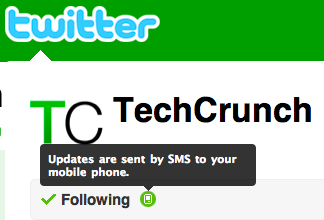
Now, on the profile for any Twitter user you follow, you will notice a little mobile phone icon surrounded by a circle. If the circle is clear, SMS updates for that user is off. If there is a green background, SMS updates are on. You can also hover over the icon to see if they are on or off. Clicking on the icon will turn them on or off. On your Following page, you will also see this same icon under the “Settings” column that you can toggle on and off.
Both of these tweaks provide a much more obvious way of handing SMS alerts. And it makes them much easier to switch on and off. Previously, there was no way to control this on individual profiles and you had to drill down into your followers to toggle them on and off.
Maintaining and expanding SMS support is important for Twitter is other parts of the world, where it remains a simple and effective way to communicate with the service. SMS remains a colossal rip-off for what it is, but in some areas, people who want to use Twitter may not really have many other options, as not all countries have affordable iPhones with data plans.
The next step will be for Twitter to turn on SMS track functionality, which will allow you to get pinged every time a certain keyword is mentioned on Twitter. But hey, one step at a time.
Note: If you aren’t seeing SMS updates working, make sure you check your Settings -> Devices area. Here, you should see your mobile phone number and in the Device Updates drop down, this should be set to “On” if you want to see updates. This is the place that you can also set Twitter to only send you text messages when you get direct messages.
Also, be careful. When I turned on Twitter notifications for the first time in a while, I was bombarded by text message tweets from hundreds of users I didn’t even realize I had turn the feature on for (not only is this annoying, but again, it’s a rip-off depending on your messaging plan).
Disrupt 2026: The tech ecosystem, all in one room
Your next round. Your next hire. Your next breakout opportunity. Find it at TechCrunch Disrupt 2026, where 10,000+ founders, investors, and tech leaders gather for three days of 250+ tactical sessions, powerful introductions, and market-defining innovation. Register now to save up to $400.
Save up to $300 or 30% to TechCrunch Founder Summit
1,000+ founders and investors come together at TechCrunch Founder Summit 2026 for a full day focused on growth, execution, and real-world scaling. Learn from founders and investors who have shaped the industry. Connect with peers navigating similar growth stages. Walk away with tactics you can apply immediately
Offer ends March 13.
The functionality still needs some UX tweaks — where’s the “set all to off” button? — otherwise it’s simply easier to keep them all off rather than going through each one to make sure they’re off.