

Meeting transcription is a hot commodity for all productivity suites. Companies like ClickUp and Zoom have added transcription with an AI summary to take on other upstarts in this vertical, including Read AI, Zoom’s assistant, Circleback, Granola, and Otter.
The latest entrant in the race to build meeting transcription tools is Notion.
The company is rolling out an AI-powered meeting notetaking feature to transcribe meetings and provide a summary of the talk points later. You can also take notes while Notion’s AI is transcribing the meeting — a functionality that closely resembles Granola.
The feature represents another step toward Notion becoming a broader productivity suite that could compete with tech giants like Google and Microsoft.
Like many other transcribers, Notion’s tool uses system audio to take notes. According to the support page, the AI notetaker is currently available on the Mac (with app version 4.7.0). During our testing, we could only use the feature on the desktop, but Notion said it will be available on its mobile app, as well.
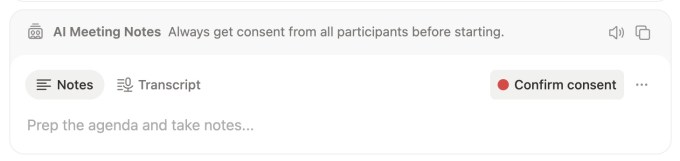
To get started with the AI notetaking feature, you’ll go to any page on Notion and type “/meet.”
The dialog box encourages you to obtain consent from all participants before allowing the AI tool to transcribe the meeting. Once you’ve done that, you can tap on the “Confirm consent” button to start the transcription.
Disrupt 2026: The tech ecosystem, all in one room
Your next round. Your next hire. Your next breakout opportunity. Find it at TechCrunch Disrupt 2026, where 10,000+ founders, investors, and tech leaders gather for three days of 250+ tactical sessions, powerful introductions, and market-defining innovation. Register now to save up to $400.
Save up to $300 or 30% to TechCrunch Founder Summit
1,000+ founders and investors come together at TechCrunch Founder Summit 2026 for a full day focused on growth, execution, and real-world scaling. Learn from founders and investors who have shaped the industry. Connect with peers navigating similar growth stages. Walk away with tactics you can apply immediately
Offer ends March 13.
When you click “stop,” the notetaking tool will generate an AI summary. You can click on the three-dot menu and select a formatting option, like Auto, Sales Call, Standup, or Team Meeting.
The support page suggests that the feature currently works for over a dozen languages, including English, Chinese, Spanish, French, German, Japanese, Korean, Portuguese, Russian, Thai, Vietnamese, Danish, Finnish, Norwegian, Dutch, and Swedish.

The company is also chasing enterprise customers with other new features launched today, like enterprise search, which allows you to search across Notion and other apps, and research mode, which allows users to research on a topic to create shareable documents through reasoning AI models.
The company says you’ll be able to use Notion AI easily to ask questions across your meetings and documents, share documents with others, or paste a meeting block in another work folder.
These features follow others designed to make Notion known for more than its flagship notes and docs app. Early last year, the company launched Notion calendar and, last month, it rolled out an AI-powered email client for Gmail that it had previously teased.

