
It’s Snapchat’s turn to copy Instagram while also staying one step ahead of its competitor. Today Snapchat launched a slew of new creative tools, several of which mimic Instagram’s features, including the option to remove the 10-second time limit on viewing photos that still disappear once closed. But Snapchat’s new option to let users erase real-world objects from their photos shows it’s still pioneering the visual communication format.
As Snap adds more creative tools, it’s now organizing them all down the right side of the screen for easy access.

Here’s a breakdown of each of the new Snapchat creative features:
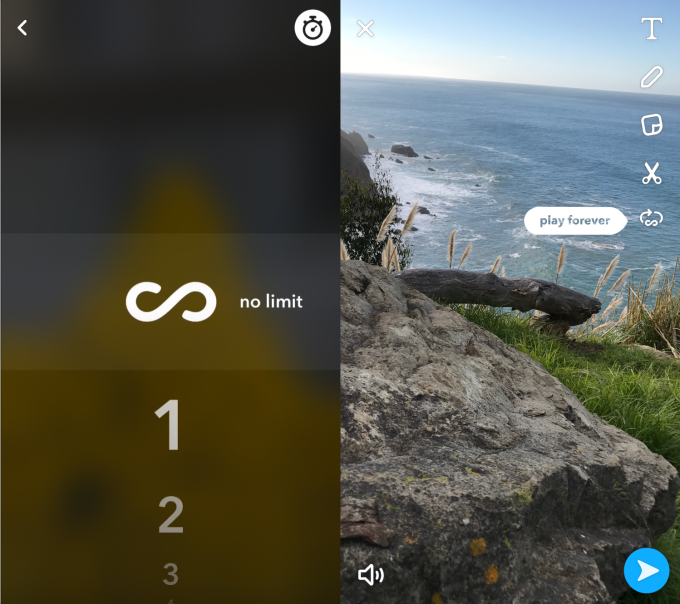
Limitless Snaps – Now you can select the infinity icon in the Snap photo timer so friends can look at the Snap as long as they want. It will still disappear once closed, though. This could be useful for sharing important information like an address via photo. Instagram already allows limitless viewing of ephemeral Stories and Direct Messages.
Looping Videos – You can tap the looping icon on the right side of the Snap composer to make your videos loop over and over, which is great for short videos or highlighting a particular moment. This gives Snap an animated GIF-style feature to compete with Instagram’s Boomerang.
Disrupt 2026: The tech ecosystem, all in one room
Your next round. Your next hire. Your next breakout opportunity. Find it at TechCrunch Disrupt 2026, where 10,000+ founders, investors, and tech leaders gather for three days of 250+ tactical sessions, powerful introductions, and market-defining innovation. Register now to save up to $400.
Save up to $300 or 30% to TechCrunch Founder Summit
1,000+ founders and investors come together at TechCrunch Founder Summit 2026 for a full day focused on growth, execution, and real-world scaling. Learn from founders and investors who have shaped the industry. Connect with peers navigating similar growth stages. Walk away with tactics you can apply immediately
Offer ends March 13.
Draw with Emoji – You can now use an emoji as a drawing brush. Select one from the creative tools on the right, and instead of a pen tip’s color, you’ll see a trail of that emoji as you draw. This takes the pain out of drawing with emojis by sticking them on one by one. Instagram actually tried something similar back in December with its Candy Cane holiday brush, but currently only offers more traditional marker, highlighter and neon brushes.
Magic Eraser – You can now select and remove objects from your Snaps, blurring their surrounding to cover the empty spot. Just select the Magic Eraser icon, paint over the object you want removed, and Snap will “Photoshop” it out automatically.