

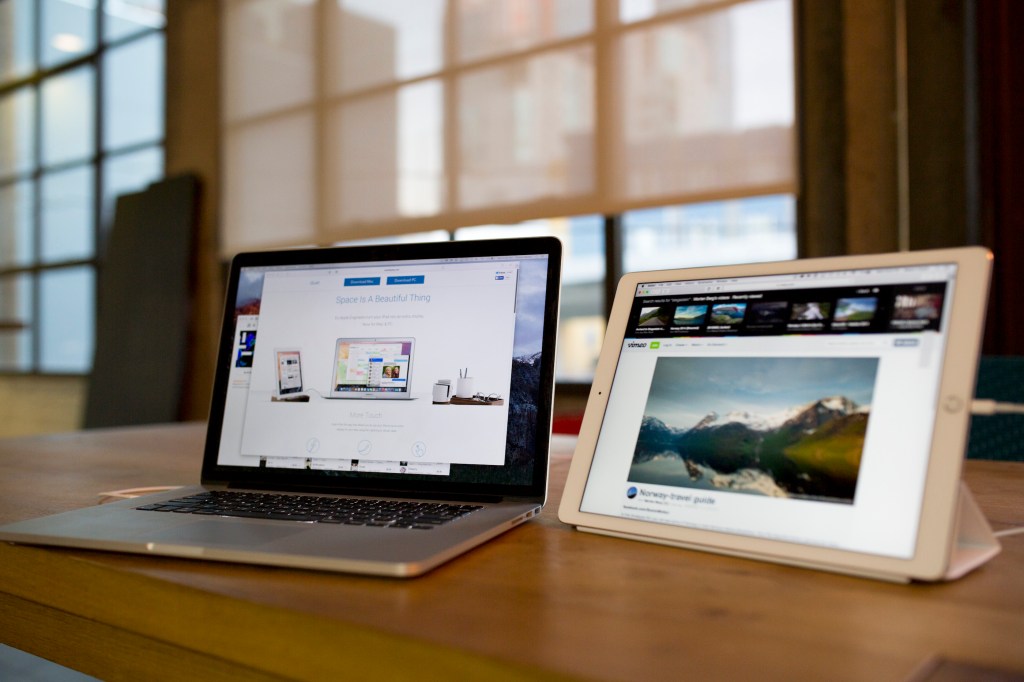
If you use a dual monitor setup at home, chances are you feel a bit constrained when you’re on a trip with your laptop. I’ve been traveling lately for Disrupt London, and Duet Display has been one of my most useful productivity tools. It’s an app that turns any iPad into a second display.
Duet Display isn’t a new app as it was first released in December 2014. But the team behind it has been working hard to make it much better with many under-the-hood improvements and an important new feature — iPad Pro support.
Here’s how it works. Duet Display is an iOS app with a desktop companion app. After purchasing the iOS app for $9.99 and installing the companion app, you just need to plug your iPad using a Lightning cable and launch the two apps. Duet Display on your computer automatically detects your iPad and adds a second display. It works with OS X and Windows.
The app’s secret sauce is that it uses your iPad cable — you get 60 frames per second without any lag, and it’s much more reliable than using a Wi-Fi network. It’s also rock solid. In my experience, you can run Duet Display for hours and the app doesn’t crash.
Duet Display isn’t for everyone. But let’s say you want to keep track of tweets and write a post at the same time in your browser and have Slack and Messages open in a corner. With Duet Display, you can view all these apps at the same time and manage everything with your keyboard and trackpad. While I love iOS, in some cases, I find it more comfortable to “run” OS X on my iPad.
And now, you can also use your iPad Pro as a second display. Given the tremendous size of the iPad Pro, it makes a lot of sense to use it as an external display. While I didn’t actually try it with an iPad Pro, if you have a 13-inch MacBook Pro, you can double the size of your screen real estate with an iPad Pro.
And yet, it wasn’t a straightforward app update. The team had to optimize the app to push all these pixels without any lag. Duet Display now supports a new higher resolution for the 12.9-inch iPad Pro display.
Disrupt 2026: The tech ecosystem, all in one room
Your next round. Your next hire. Your next breakout opportunity. Find it at TechCrunch Disrupt 2026, where 10,000+ founders, investors, and tech leaders gather for three days of 250+ tactical sessions, powerful introductions, and market-defining innovation. Register now to save up to $400.
Save up to $300 or 30% to TechCrunch Founder Summit
1,000+ founders and investors come together at TechCrunch Founder Summit 2026 for a full day focused on growth, execution, and real-world scaling. Learn from founders and investors who have shaped the industry. Connect with peers navigating similar growth stages. Walk away with tactics you can apply immediately
Offer ends March 13.

I asked Duet Display whether Duet Display was taking advantage of the iPad Pro’s new Lightning port — the port now supports USB 3.0 transfer speeds. Apple hasn’t released a USB 3.0 to Lightning cable yet, so the team has to wait for a new cable.
I could still see the performance improvement with my iPad. Before this update, my CPU was running hot because of Duet Display. Now, I can’t notice if I’m running Duet Display or not. The team promises that CPU usage has been reduced by over 80 percent on both the iPad and Mac or PC. Not bad.

