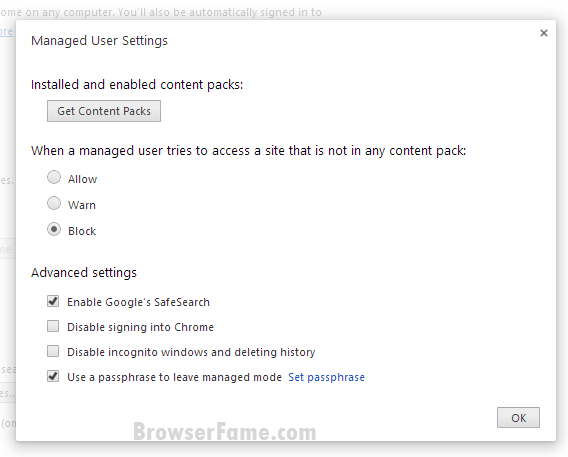
Hiding quietly in a deluge of brand new Google software updates, including major updates to Google+, the search giant has been tinkering with a new feature for Chrome that should leave parents quite pleased with the ever-popular browser.
A few developers have uncovered Managed User Settings in the latest build of Canary / Chromium, though the feature hasn’t become entirely public just yet.
Currently, all Chrome users can set up multiple user profiles and sync them together in the browser. This allows for personalized settings for each user, even on a shared device.
However, with the way it sits right now, each user has the ability to modify their own settings and privileges, without any interference from other users.
Once the new feature is implemented, users will be able to create less-privileged users. Managed users will only have pre-configured access to sites that the Chrome manager thinks appropriate.
A screengrab taken from Browser Fame shows that the root user can also disable incognito mode and make it impossible for other users to delete browsing history.
There’s nowhere to hide, teenage males, so get to the good stuff while you can. Managed User accounts are allegedly on the way.
Disrupt 2026: The tech ecosystem, all in one room
Your next round. Your next hire. Your next breakout opportunity. Find it at TechCrunch Disrupt 2026, where 10,000+ founders, investors, and tech leaders gather for three days of 250+ tactical sessions, powerful introductions, and market-defining innovation. Register now to save up to $400.
Save up to $300 or 30% to TechCrunch Founder Summit
1,000+ founders and investors come together at TechCrunch Founder Summit 2026 for a full day focused on growth, execution, and real-world scaling. Learn from founders and investors who have shaped the industry. Connect with peers navigating similar growth stages. Walk away with tactics you can apply immediately
Offer ends March 13.
To check it out yourself, download the latest Chromium here and choose the Canary build, which shows the cutting-edge releases in real-time, before any testing. Use the –enable-managed-users switch and the –managed switch, which you do on OS X through Terminal.app and on Windows through the File Explorer, (more info here). Here’s exactly what you need to type into Terminal on OS X to get this working, so long as you have Canary installed:
/Applications/Google\ Chrome\ Canary.app/Contents/MacOS/Google\ Chrome\ Canary –enable-managed-users –managed
Once you’ve done that, type “chrome://settings/managedUser” into your Canary address bar to access the new user management pane.
Be warned: this is a bleeding edge build of the Chrome browser, so expect things to be far from stable, and it involves a fair amount of under-the-hood tinkering, so it isn’t for novices.