

When Apple’s App Store was first announced, many of us envisioned a fleet of applications that would turn the iPhone into a mobile computing powerhouse – any functionality that Apple neglected to include would be quickly introduced by third party developers. Unfortunately, the store has largely failed to deliver on that potential, as developers have shied away from full-featured, useful apps in favor of flashy novelties that are cheaper to produce and more profitable. There may be a few diamonds in the rough, but you’d never know it – 75% of the top apps list (which is the first thing most people look at) consists of games.
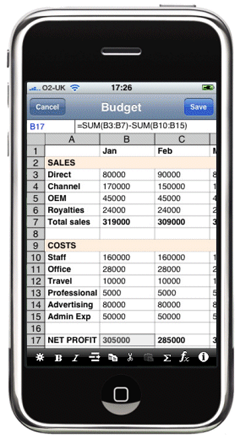
Today sees the launch of an iPhone app that attempts to fulfill the store’s original promise by adding a truly useful feature to the iPhone that many have longed for since its introduction: modifiable spreadsheets. The iPhone has allowed users to view Excel and Numbers files since its launch, but until now users have been unable to create or edit them. The aptly named Spreadsheet application is available for $7.99 here, claiming to be the first Excel-like program on the platform. And it delivers, but with one deal-breaking caveat.
Included among Spreadsheet’s features are:
-Multiple cell types, including Numeric, Date, Time, Currency, Percentage and Text
-Cell formatting options, including bold, italic, text and background color, cell sizes and alignments.
-Copy/cut/paste operations.
-A range of functions, including date/time, math, statistical, string and trigonometric functions.
-Export (via email) to external spreadsheet applications.
The program’s most glaring flaw is its inability to import Excel spreadsheets – something the developer promises to release in the next update, but should have been included from the start. This oversight will make the program nearly useless for most professionals, but if you’re only looking to make basic spreadsheets on the fly it works as advertised. Files made on the phone are saved in the standard XML format, and can be Emailed for further modifications on PCs. The interface will be familiar to anyone who has used Excel or a similar program before – you use your finger to select cells, and can enter numbers and equations using the same syntax.
Spreadsheet may be the first app available in this space, but a number of other offerings are on the way, including Mariner.

